 QuoteCloud
Why an adjustment isn't available or didn't apply
Fixes for greyed-out options, skipped rows and discounts that don't appear the way you expected.
Options that aren't available
Why is the option greyed out on this row?
The menu says why. It's unavailable on a row with a total typed in by hand, or with a negative price. Headings can't be adjusted. Change the row, or add the discount to a different row.
Why can't I choose the Discount tab?
Your role needs Discount Access. Ask an admin to turn it on, or ask someone who has it to add the discount. You can still add a markup or margin.
Why can't I add a markup or margin?
The row's price may be locked. It also needs a cost, so enter one under Cost per unit. A margin must be under 100%.
Why do I see an upgrade message when I select the option?
Your company doesn't have the Line Item Adjustments add-on. It's included on the Business plan and above, and during a trial.
Hidden discounts
Why can't I turn on Hide from customer?
The switch tells you why. A fixed amount off the whole line can't be hidden if your customer can change the quantity, and a discount that comes off once can't be hidden if they can change the term. Neither can an after-tax discount. See Hide a discount from your customer.
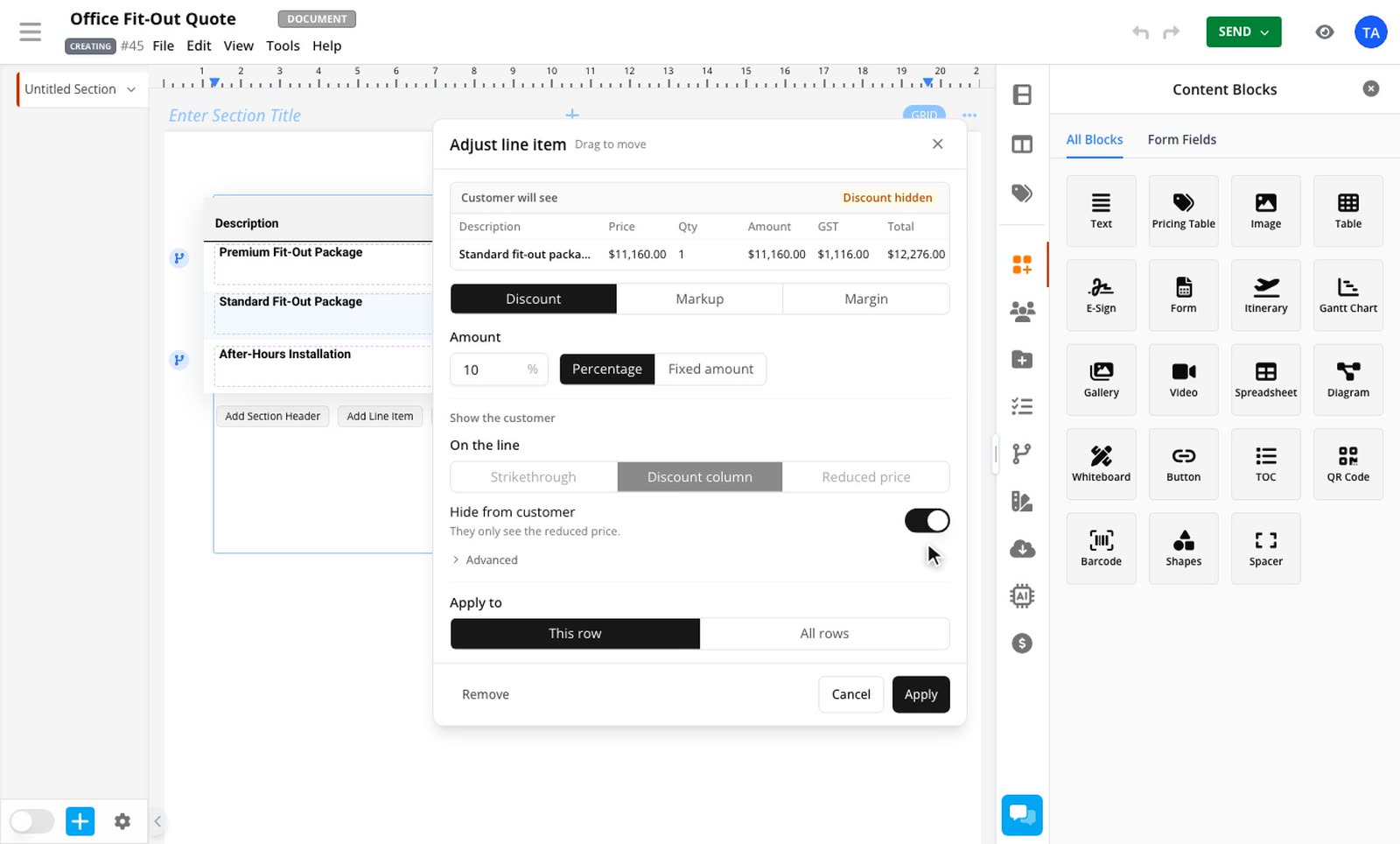
I hid the discount, so why is there a discount column?
Another row in the table probably uses Discount column, because the column belongs to the whole table. The hidden row shows $0 there, the same as a row with no discount. Change the other row to Strikethrough or Reduced price, or hide the column.
Totals
Why doesn't my discount appear in the totals?
A line discount only appears in the totals if the table's Discount total is showing. Otherwise it comes off the subtotal. Hidden discounts always come off the subtotal. See Choose how a discount appears.
Why does my subtotal look different in the editor?
While you're editing the table, a hidden Discount total stays on screen with the full subtotal so you can check the figures. Open Preview to see what your customer gets.
Pricing rules
What does Skips 2 rows mean on my rule?
Those rows can't take the adjustment, and the rule still works for the others. Hover over the label to see why. The usual reasons are a total typed in by hand, a negative or locked price, or a markup or margin on a row with no cost.
My rule doesn't change the row in the editor
Check that the condition is met, for example that the trigger row is ticked. While you're editing the table, its boxes keep your saved figures and a Rule label shows what the rule sets. Click away from the table, or use Preview as recipient.
Two rules change the same row. Which one wins?
The first one in the Logic panel. Each row takes one adjustment.
My rule says Change how the discount shows, but nothing happens
That rule only changes a discount the row already has. Rows with no discount stay as they are. To add one, use Set a discount.
My recipient lowered the quantity and the discount disappeared when they accepted
A fixed discount larger than the line is skipped when they accept. Use a percentage if your recipient can change the quantity.
I changed the rows after sending, and my recipient sees old prices
They need to reload the page. Accepting always uses the current rows.
Related guides
- Discounts, markup and margin on a line itemGive any row in a price table its own discount, markup or margin, and choose what your customer sees.Line Item Adjustments add-on
- Change a discount, markup or margin with a pricing ruleTurn a discount or margin on or off, set its amount and choose whether to show it, based on what your recipient selects or answers.Line Item Adjustments and Conditional Pricing add-ons